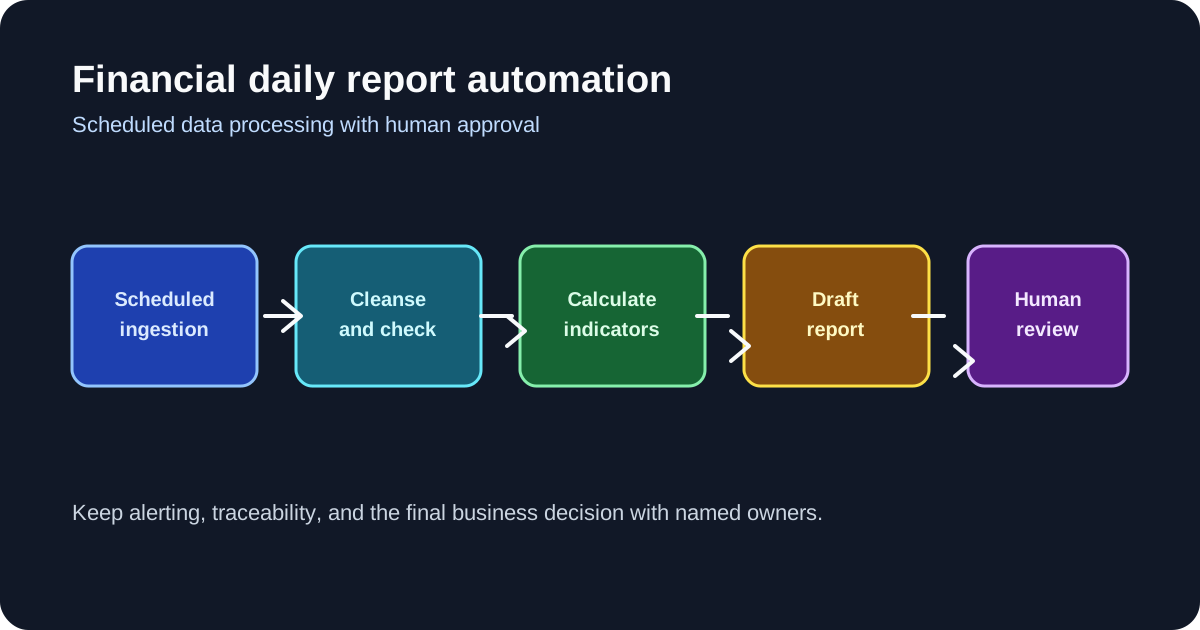
Financial teams can automate recurring data collection, cleansing, calculations, template population, and report drafting. Human owners remain responsible for anomalies, professional interpretation, sensitive content, and final approval. A reliable workflow makes each automated step observable and gives reviewers a clear handoff.
1. Confirm the task fits scheduled automation
Choose a scenario with a stable report structure, approved data sources, a recurring business cadence, and rules that can be reused. Record the owner, inputs, outputs, failure impact, alert recipients, and manual-takeover condition. Variable work that depends on expert judgment keeps a manual path or starts with a narrower scope.
2. Configure the five workflow stages
- Scheduled ingestion: Bind approved pages, APIs, files, or databases and define the frequency and time zone. Confirm source freshness and access permissions.
- Data cleansing: Standardize non-uniform text, mark missing values, and flag outliers. Preserve the original source and the cleansing result for review.
- Indicator calculation: Apply approved year-over-year, month-over-month, or other financial calculations. Store calculation definitions and input versions.
- Template population: Map cleaned fields and calculated values to approved spreadsheet or document templates. Validate field positions and required values.
- Chart and draft generation: Produce the configured visualization and report draft. Mark the output as a draft until the named reviewer completes approval.
3. Define alerts, recovery, and audit trails
Alert on source failures, stale data, threshold changes, empty output, calculation errors, and template mismatches. A useful alert includes the task identifier, failed stage, source status, output location, and recovery owner.
Use bounded retries for temporary failures and define a permitted backup source. Check field definitions and freshness before switching sources. When retries are exhausted, the runbook names the response time, manual collection method, reviewer, and rerun rule. The audit trail links the run, inputs, configuration version, output, alerts, and review decision.
4. Keep human decisions at the right boundary
| Automation owns | Human review owns |
|---|---|
| Pulling fixed sources and basic aggregation | Checking anomalies and source meaning |
| Applying approved calculations and templates | Validating conclusions and business context |
| Generating charts and report drafts | Reviewing sensitive content and external wording |
| Recording execution status and alerts | Approving, returning, or escalating the draft |
An automated success status confirms execution. It does not confirm the truth or suitability of a report. The reviewer stores the decision with the report version and records any corrections or exceptions.
5. Roll out in controlled steps
5.1 Validate one representative report
Run the workflow in a test environment and inspect source access, freshness, field mapping, calculations, format, and output location. Compare the draft with an independently checked sample.
5.2 Validate recurring runs
Run several cycles and verify the schedule, time zone, permissions, logs, notifications, and output retention. Measure delivery timeliness and review effort alongside execution success.
5.3 Drill recovery and review
Simulate source failure, network interruption, stale data, and a calculation exception. Confirm bounded retries, alerts, backup handling, manual takeover, correction, and rerun. Have the named reviewer approve normal, boundary, and failed drafts.
5.4 Expand to a report suite
Reuse a validated workflow for similar reports, then add cross-type reports only after their sources, templates, calculations, and reviewers receive separate acceptance. Keep a versioned rollback action for each expansion.
6. Product boundaries and operating limits
- Generated drafts require professional review because model output and source data can contain errors.
- Retrieval, cleansing, and calculations depend on source quality, rules, permissions, model behavior, and deployment resources.
- Strict departmental isolation, external synchronization, audit, compliance, monitoring, or cost requirements require environment-specific controls and verification.
- Concurrency, response time, file handling, workflow duration, and model stability follow the deployed database, queue, network, and service configuration.
7. Authorized case references
The approved case set includes China Merchants Securities International and Chaoyang Yongxu Information Technology Co., Ltd. The China Merchants Securities International reference covers an automated yield-reporting workflow that reduces recurring collection and formatting effort. The authorized Chaoyang Yongxu reference records AI-assisted financial report drafting with per-person daily output moving from 3–5 articles to 50 articles, alongside human editorial review.
These outcomes depend on each institution's data quality, scenario boundaries, deployment resources, and operational investment. They provide context for planning and validation; another project needs its own evidence and acceptance thresholds.